
1. What Is a Settlers Combat Simulator?
A Settlers Combat Simulator is a battle prediction tool for strategy games in the Settlers family (The Settlers: Heritage of Kings, The Settlers: Rise of an Empire, The Settlers: New Allies, and similar real-time strategy/city-building hybrids).
Unlike pure RTS games where you react in real time, Settlers games combine economic management with tactical battles. This means every unit you train costs resources. Wasting an army on a losing battle sets your economy back significantly.
A combat simulator allows you to:
- Input your army composition (unit types and counts)
- Input the enemy army composition (known or estimated)
- Run thousands of simulated battles in seconds
- See the probability of victory and estimated casualties
Why this matters: In Settlers games, information is as valuable as iron or gold. Knowing whether your 20 swordsmen can defeat 15 archers + 5 cavalry before you march across the map saves you from humiliating defeat and hours of rebuilding.
2. Why Simulate Battles? (Save Resources, Win More)
New players often rely on gut feeling: “I have more units, so I will win.” This is a mistake. Settlers combat has deep counter systems where a smaller, well-chosen army can defeat a larger, poorly composed one.
Three reasons to simulate every major battle:
Reason 1: Resource Conservation
Training a single knight might require:
- 50 gold
- 30 iron
- 20 food
- 5 minutes of real time
Losing 10 knights in a bad fight means 500 gold, 300 iron, and 200 food gone. A simulator costs nothing. A lost army costs everything.
Reason 2: Learning the Counter System
You cannot memorize every unit matchup. A simulator acts as a training tool – you will quickly learn that pikemen beat cavalry, archers beat pikemen, and cavalry beat archers. After 20 simulations, the counters become second nature.
Reason 3: Risk-Free Experimentation
In the actual game, you cannot rewind time. A simulator lets you test wild strategies:
- “What if I send only catapults?”
- “What if I mix 10% healers with 90% infantry?”
- “What is the minimum army needed to defeat that enemy outpost?”
None of these experiments cost you in-game resources. Learn for free, then execute with confidence.
3. Core Combat Mechanics in Settlers-Style Games
Before using any simulator, you need to understand what it is simulating. Most Settlers games share these core mechanics:
Unit Classes (Typical)
| Class | Strengths | Weaknesses | Example Units |
|---|---|---|---|
| Infantry (Swordsmen) | Balanced, good vs. archers | Weak vs. cavalry, slow | Swordsman, Axeman |
| Pikemen (Spearmen) | Strong vs. cavalry | Weak vs. archers | Spearman, Halberdier |
| Archers | Ranged, strong vs. pikemen | Weak vs. cavalry, weak in melee | Bowman, Crossbowman |
| Cavalry | Fast, strong vs. archers | Weak vs. pikemen | Knight, Horseman |
| Siege (Catapults) | High damage, destroys buildings | Very slow, weak in melee | Catapult, Trebuchet |
| Healers/Support | Extends army lifespan | No offensive power | Monk, Priest |
Combat Flow (Typical)
- Engagement range: Archers and siege fire first from distance.
- Charge phase: Cavalry charge into melee, taking reduced damage during charge.
- Melee phase: Infantry and pikemen engage. Units cannot attack while moving.
- Morale checks: If casualties exceed 50% in short time, units may flee.
- Pursuit phase: Victorious units chase and kill fleeing enemies.
Damage Calculation (Simplified)
Most simulators use variations of:
text
Damage per hit = Base Attack × (Attack Bonus vs. Unit Type) ÷ Target Armor
For example:
- Pikeman base attack: 10
- Attack bonus vs. cavalry: +200% (so 30 total)
- Knight armor: 5
- Damage per hit = 30 ÷ 5 = 6 damage
A knight with 60 health dies after 10 pikeman hits.
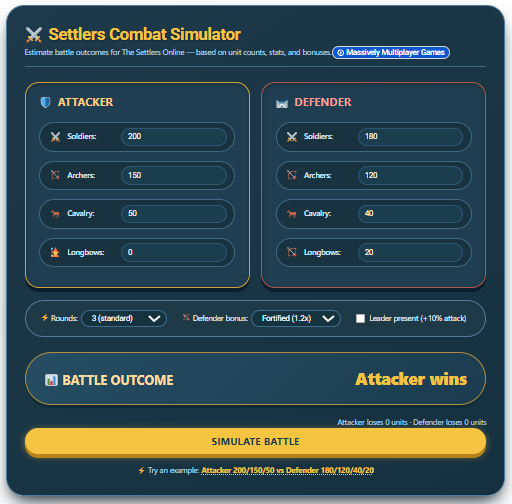
Settlers Combat Simulator Calculator
4. How to Use a Combat Simulator (Step by Step)
Assuming you are using a standard Settlers Combat Simulator (like the one we plan to offer on SmartUnitCalculator.com), follow these steps:
Step 1: Select Your Army
- Choose unit types from dropdown menus
- Enter quantity for each type
- Example: 15 Swordsmen + 10 Archers + 5 Cavalry
Step 2: Select Enemy Army
- If you have scout reports, input exact enemy composition
- If you are planning a general assault, input a “likely” composition
- Example: 20 Pikemen + 5 Cavalry
Step 3: Set Battle Conditions (If Available)
- Terrain: Open field (favors cavalry), forest (favors archers), hills (favors infantry)
- Morale: High (after a recent victory), low (after retreat), normal
- Defensive structures: Walls, towers, or traps (reduces attacker advantage)
Step 4: Run Simulation
Click “Simulate Battle.” Most simulators run 1,000+ iterations to account for random factors (critical hits, misses, morale breaks).
Step 5: Interpret Results
Look for:
- Win probability: Above 70% is good. Above 90% is excellent.
- Expected casualties: How many of your units survive?
- Margin of victory: Crushing win (all enemies dead, 80%+ of your army alive) vs. Pyrrhic victory (all enemies dead, but your army is crippled).
Step 6: Iterate
If win probability is below 60%, adjust your composition. Swap 5 swordsmen for 5 pikemen. Add 3 archers. Remove cavalry if fighting in a forest. Run again. Repeat until you find the minimal winning army.
5. Unit Types and Counters (Rock-Paper-Scissors Explained)
This is the most important table in this guide. Memorize it.
| If Enemy Has Mostly… | You Should Build… | You Should Avoid… |
|---|---|---|
| Infantry (Swordsmen) | Archers + Your own Infantry | Cavalry (infantry beats cavalry in many games) |
| Pikemen | Archers + Cavalry | Your own Pikemen (mirror match is inefficient) |
| Archers | Cavalry + Pikemen (to close distance) | Slow Infantry (they get shot before reaching) |
| Cavalry | Pikemen + Archers (pikemen counter, archers support) | Your own Cavalry (unless you have overwhelming numbers) |
| Mixed (Balanced) | Balanced army + 10% more archers | Extreme single-unit compositions |
| Siege Weapons | Cavalry (fast flanking) | Slow Infantry (siege outranges them) |
Pro tip: A common noob trap is building only your favorite unit type. The player who adapts their composition to counter the enemy wins 80% of the time, even with a smaller army.
6. Advanced Strategies: Terrain, Morale, and Flanking
A basic simulator assumes a flat, open battlefield with both armies starting at normal morale. Real Settlers battles have more variables. Here is how to account for them manually if your simulator does not include them yet.
Terrain Modifiers
| Terrain | Advantage | Disadvantage |
|---|---|---|
| Open Field | Cavalry (+20% effectiveness) | Archers (-10% cover bonus) |
| Forest | Archers (+15% from cover) | Cavalry (-30% speed and charge damage) |
| Hills | Infantry (+10% attack from height) | Cavalry (-20% uphill charge) |
| River Crossing | Defenders (+25% advantage) | Attackers (disrupted formation) |
| Fortified (Walls/Towers) | Defenders (+50% to +200%) | Attackers (require siege weapons) |
Morale System
Morale affects attack speed, damage, and chance to flee.
- High morale (green): +15% attack speed, -20% chance to flee
- Normal morale (yellow): Base stats
- Low morale (orange): -15% attack speed, +30% chance to flee
- Broken (red): Units automatically flee
How to raise morale before battle:
- Win previous battles (momentum)
- Have a general or hero unit present
- Outnumber enemy 2:1 or more
- Use abilities (if your game has them)
How to lower enemy morale:
- Kill their general first
- Flank from the sides or rear
- Use siege weapons to cause sudden, massive casualties
Flanking
When you attack from multiple directions, the enemy cannot face all threats simultaneously. Simulators often model this as:
- Frontal attack only: Enemy uses 100% of their defensive strength
- Flank attack (side): Enemy uses 70% of defensive strength against flanking force
- Rear attack: Enemy uses 40% of defensive strength
Practical application: Even if your simulator cannot model flanking directly, you can approximate by increasing your effective army size by 20-30% when planning a flanking maneuver.
7. Common Mistakes Players Make (And How to Avoid Them)
Mistake #1: Ignoring the Simulator Entirely
Result: You lose armies you could have saved. You win battles but take unnecessary casualties.
Fix: Simulate every major battle. It takes 30 seconds and saves hours of rebuilding.
Mistake #2: Only Simulating Your “Dream Army”
Result: You never learn the minimal force needed. You waste resources over-building.
Fix: Start with a small army in the simulator. Increase slowly until you find the smallest army that still wins reliably.
Mistake #3: Forgetting Economy in Simulations
Result: You win the battle but cannot afford to replace casualties for the next fight.
Fix: After finding a winning army composition, calculate its total resource cost. Compare to your current stockpile. If the cost is too high, go back to the simulator and try a cheaper composition (e.g., replace expensive knights with cheaper pikemen if the matchup allows).
Mistake #4: Assuming 100% Win Probability Means Guaranteed Win
Result: You become overconfident and stop scouting.
Fix: Even 99% win probability means 1 loss in 100 battles. If that battle is a tournament final or a base-raid that loses you the game, scout anyway. The simulator is a tool, not a prophecy.
Mistake #5: Never Simulating Defense
Result: You build static defenses (walls, towers) without knowing if they matter.
Fix: Simulate attacks on your own base. Use the enemy army compositions you have seen in multiplayer or campaign. If the simulator shows you losing even with towers, you need more mobile units, not more walls.
8. Interpreting Simulator Results: Beyond “Win/Loss”
A good simulator gives you more than a binary win/loss. Here is what to look for:
Metric 1: Casualty Exchange Ratio
Formula: Enemy units killed ÷ Your units lost
- Ratio > 2.0: Excellent. You are trading efficiently.
- Ratio 1.0 to 2.0: Average. Acceptable for important battles.
- Ratio < 1.0: Poor. You are losing more than you kill. Avoid unless battle is critical.
Metric 2: Survivor Quality
Losing all your veteran units (high experience) is worse than losing recruits.
Check: Does the simulator track experience levels? If yes, prioritize protecting your highest-tier units even if it means sacrificing lower-tier ones.
Metric 3: Battle Duration
Short battles (under 30 seconds in game time) favor high-damage units like cavalry and siege. Long battles favor units with high health and healing.
Adjust strategy: If your simulator shows a long battle but you have no healers, add healers and rerun.
Metric 4: First Blood
Which side gets the first kill? The side that strikes first often wins because they reduce enemy damage output immediately.
If enemy gets first blood consistently: You need faster units, longer range, or better positioning.
9. Frequently Asked Questions
10. Pro Tips from Top Players
Tip #1 – The 60/40 Rule
Never send more than 60% of your total army to any single battle unless it is the final, game-winning fight. Keep 40% in reserve to defend your economy or reinforce failure.
Tip #2 – Scout, Then Simulate, Then Attack
In the time it takes to train 10 knights, you can scout the enemy base, run 20 simulations, and choose the optimal composition. Information is faster than production.
Tip #3 – The Healer Economy
Healers are expensive to train but cheap to maintain. In simulations, adding just 3 healers to a 20-unit army often reduces casualties by 40-50%. Test this yourself.
Tip #4 – Retreat is a Strategy
If a simulation shows 30% win probability, do not attack. Retreat, rebuild, and re-simulate with a different composition. The player who knows when to retreat wins more games overall.
Tip #5 – Simulate Your Own Defenses
Once per play session, simulate an attack on your own base using the strongest army you have faced recently. If you lose, improve your defenses before the real attack comes.
11. Conclusion: Simulate, Then Dominate
A Settlers Combat Simulator is not a crutch for weak players. It is a tool that turns guessing into knowing. Every hour you spend simulating saves you five hours of rebuilding lost armies.
Your action plan starting today:
- Find a simulator – If you do not have one, bookmark this page. We are building one specifically for Settlers games.
- Simulate your last three lost battles – Input the real army compositions. See what you should have built instead.
- Create a reference sheet – Write down the minimal army needed to defeat common enemy compositions (e.g., “10 pikemen + 5 archers beats 8 cavalry + 4 infantry”).
- Simulate before every major attack – Make it a habit. Thirty seconds of simulation saves thirty minutes of rebuilding.
Combat in Settlers games is a puzzle. The simulator gives you the solution. Now go win some battles.